Customer Service
Steps to Send a Message on Dotforma
Due to periods of high demand, our response time may vary, ranging from a few minutes to a few hours. Please do not worry, as we assure you we will respond to your message. No matter the nature of your inquiry or request, we will be right back to you as soon as possible!
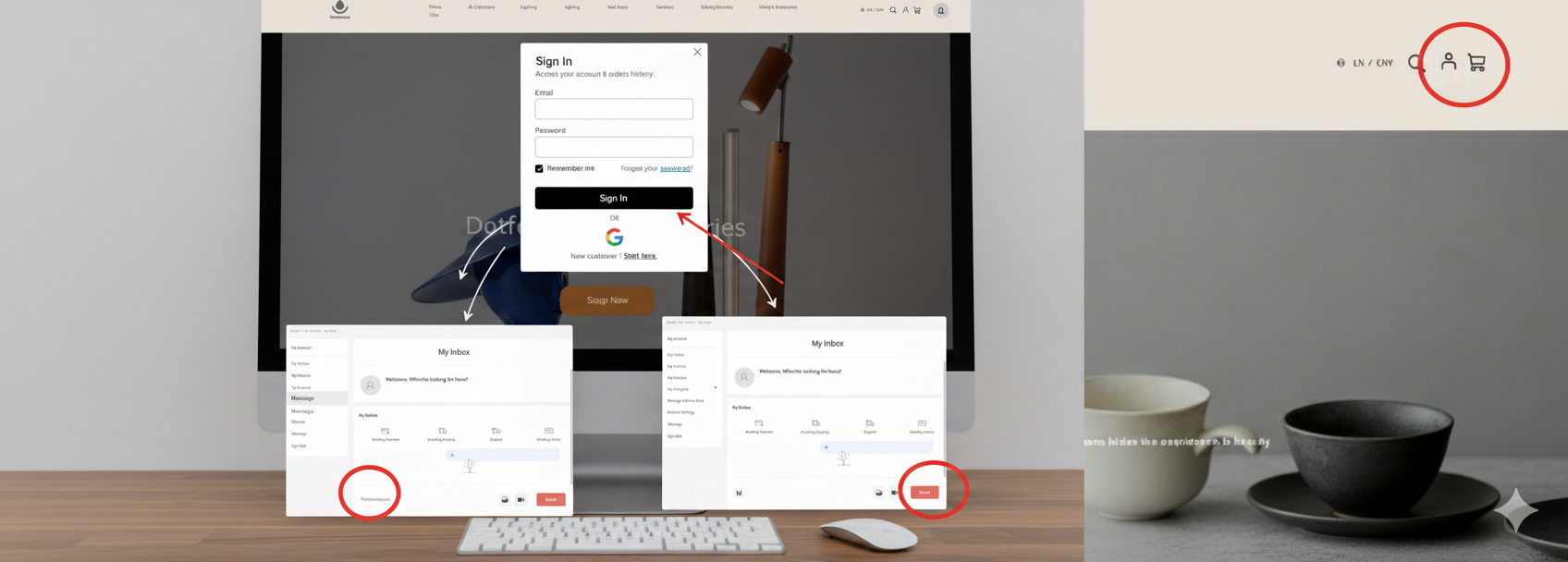
Step 1: Click the Account Icon on the Header
Locate and click the account icon (silhouette of a person) in the top-right corner of the website header.
Step 2: Log In or Register
A Sign In pop-up will appear. Enter your Email and Password to log in, or click "Start here." to register as a new customer.
Step 3: Click Message
Once logged in, you will be taken to your My Account page. In the left-hand navigation menu, click Message (located near the bottom of the list).
Step 4: Send Us a Message
You are now in your My Inbox. Type your message into the text box at the bottom where it says "Please enter your message here..." and click the Send button.